Minecraft Circle Guide: How to Build Perfect Circles, Spheres & Domes
By CircleGenPublished Updated
Why Circles Are Hard in Minecraft
Minecraft worlds are made of square blocks on a grid. There are no curved edges, so every circle is an approximation — a ring of pixels that looks round from a distance. The key insight is that the larger the diameter, the smoother the curve looks. A 5-block circle is obviously jagged, but a 31-block circle reads as a clean ring even up close.
CircleGen uses the midpoint circle algorithm to place blocks where their center distance from the middle falls within half a block of the radius. This produces the most accurate pixel-circle at any given diameter.
Odd vs Even Diameter
Odd diameters (5, 7, 9, 11, …) have a single center block. This makes them ideal for towers, pillars, and any build where you want a clear center point for a roof, beacon, or pillar.
Even diameters (6, 8, 10, 12, …) have a 2×2 center area. They work well for walls, enclosures, and builds where you don't need a single center block — especially round walls around an existing structure.
Odd diameters are generally recommended for beginners because the single center block makes placement simpler and the resulting circle is always symmetric along both axes.

How to Build a Circle Manually
- 1. Choose an odd diameter. Pick a size that fits your build. Odd numbers (7, 9, 11, 15, …) give you a single center block, which makes placement easier.
- 2. Mark the center block. Place one block where you want the center of the circle. This is your reference point for everything else.
- 3. Build the cardinal axes. From the center, count outward in each of the four directions (north, south, east, west) and place a block at the radius distance. For a diameter-9 circle, that means 4 blocks out from the center in each direction.
- 4. Connect the tips. Between each pair of axis endpoints, add blocks to form the curve. The CircleGen blueprint shows you exactly which cells to fill for each quadrant.
- 5. Mirror the quadrants. Once you build one quadrant, copy the pattern to the other three. Every pixel circle is symmetric along both the horizontal and vertical axes.
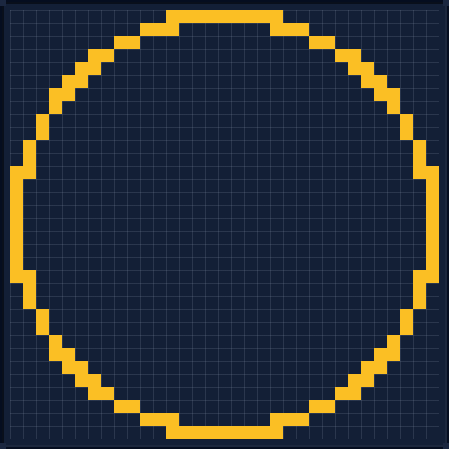
Circle Size Quick Reference
| Diameter | Hollow Blocks | Filled Blocks | Best For |
|---|---|---|---|
| 7 | 16 | 33 | Wells, chimneys |
| 9 | 32 | 57 | Watchtowers, ponds |
| 11 | 28 | 89 | Fountains, small rooms |
| 15 | 40 | 169 | Tower bases |
| 21 | 56 | 333 | Arenas, large rooms |
| 31 | 84 | 729 | Castle walls, dome bases |
| 41 | 112 | 1,293 | Large arenas |
| 51 | 168 | 2,005 | City walls |
Counts are exact blueprint counts. At small diameters the ring can be two blocks thick in places, so counts do not always increase smoothly.
Common Mistakes to Avoid
- Using even diameters when you need a center point. Even circles have a 2×2 center, which makes it impossible to place a single pillar, beacon, or roof center. Always use odd diameters for towers.
- Guessing block placement. Eyeballing a circle leads to asymmetric results. Use a blueprint (like CircleGen) to know exactly which cells to fill before you start building.
- Ignoring the filled-vs-hollow difference. A filled circle and a hollow circle use very different block counts. Make sure you know which one your build needs — a dome base is hollow, a platform is filled.
- Starting too small. Small circles (diameter 5–7) are noticeably jagged. If aesthetics matter, go at least to diameter 9 or 11 for visible curves, and 21+ for smooth-looking results.
How This Guide Was Made
The blueprints in this guide come from the same discrete-circle algorithm that powers the CircleGen generator. Block counts were checked against generator output rather than estimated by hand. This is an explanation of the generator's grid math; we do not claim hands-on in-game testing of every build.
Spotted a count or pattern that does not match the generator? Send a correction through the contact page and we will fix it.
FAQ
How many blocks do I need for a hollow Minecraft circle?
It depends on the diameter. A diameter-7 hollow circle uses 16 blocks, diameter-9 uses 32, diameter-11 uses 28, diameter-15 uses 40, diameter-21 uses 56, diameter-31 uses 84, diameter-41 uses 112, and diameter-51 uses 168 blocks. Use the CircleGen generator to get exact counts for any diameter.
Do circles work differently in Java and Bedrock?
No. The pixel-circle algorithm uses the same grid math in both editions. Every blueprint from CircleGen works identically in Java Edition and Bedrock Edition.
What is the best diameter for a Minecraft circle?
It depends on your build. For wells and chimneys, 7–9 is ideal. Watchtowers and ponds work well at 9–11. Fountains and small rooms suit 11–15. Tower bases look best at 15–21. Arenas and large rooms need 21–31. Castle walls and dome bases work at 31–51. Larger diameters always produce smoother curves.
How do I build a sphere in Minecraft?
A sphere is a stack of circle slices of varying diameters. Start with the largest circle as the equator, then place progressively smaller circles above and below it until they taper to a single block at the top and bottom. Use the CircleGen sphere generator to get each slice as a block-by-block blueprint.
Related Guides
- Minecraft Sphere Guide — turn flat circles into a layer-by-layer sphere with an equator-first workflow.
- Minecraft Dome Guide — build a half-sphere on a flat base for roofs, kilns, and observatories.
- Minecraft Tower Guide — match a footprint to interior space, stair width, and wall thickness.
- Minecraft Oval Guide — stretch the circle method into ponds, tables, and round rooms.
- Diameter-21 sphere blueprint — open a ready-made layered slice reference in the generator.