Minecraft Sphere Guide: Build a Round Sphere Layer by Layer
By CircleGenPublished Updated
A Sphere Is a Stack of Circle Slices
Minecraft has no curved blocks, but a sphere does not need curves. It needs stacked horizontal circle slices. The widest slice sits at the equator; slices above and below it shrink toward a single-block cap. From the side, the ring edges form a ball.
CircleGen's sphere mode lists every slice from bottom to top and shows the exact ring for each height. This guide explains how to use that output. For the rings at your diameter, use the sphere generator rather than calculating them by hand.
How the Generator Turns a Sphere Into Slices
Each slice is a circle whose width depends on its distance from the equator. At the equator, for an odd diameter, it is the full width. Toward a pole, the width drops in odd-numbered steps until the slice becomes a small ring and then a cap. The generator applies the same one-block circle-outline routine used for flat circles and stacks the results in order.
The layer list is more useful than a single sphere picture: it tells you which ring to place at each height. Use the preview for orientation and the layer grid for placement.
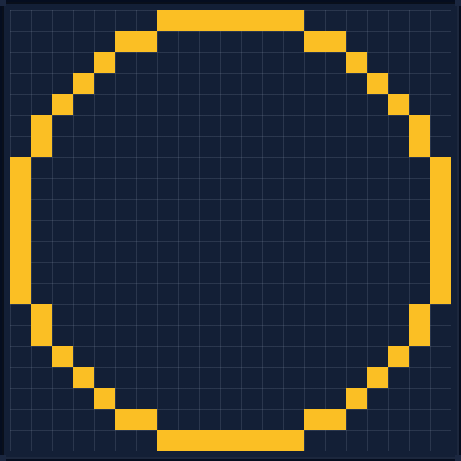
Odd vs Even Diameter
Odd diameters are the natural fit. They keep one center block in every slice, giving the stack a single vertical axis from bottom cap to top cap. A diameter-21 sphere is a good example of a size where that center column stays easy to track while building.
The generator builds every slice from an odd-width circle. Even inputs still work, but resolve to the next odd width: a sphere entered as diameter 20 ends up with a 21-block equator. That is fine for overall scale, but it matters if the sphere must fit an even-width room or an existing 2×2 center. When the footprint has to match a plan, choose an odd diameter.
The Equator-First Workflow
Starting at a pole is tempting, but the equator sets the footprint. Build the widest ring first. On a full sphere it sits at the widest point, not on the ground.
- 1. Choose an odd diameter. Preview it and confirm the equator width fits the site, including any wall or path around it.
- 2. Mark the center. Place a temporary pillar tall enough to pass both caps. Every ring is measured from it.
- 3. Build the equator ring. Put it at the widest height and follow the slice cell by cell. Check all four quadrants before continuing.
- 4. Build the lower half. The layer list is bottom-to-top, so read it in reverse below the equator. Shrink each ring toward the bottom cap; use scaffolding if the equator is above ground.
- 5. Build the upper half. Return to the equator and follow the list upward until the top cap is one block.
- 6. Close the caps. Check the silhouette from four sides before removing the pillar and adding detail.
If you prefer to build ground-up, follow the list in order. Still verify the equator as a full ring; do not guess its shape from the smaller layers below it.
Hollow vs Solid Spheres
CircleGen's sphere output is a shell: every layer is a ring, and the total counts the shell only. That suits most builds. A hollow sphere gives you an interior and uses far fewer blocks.
Solid spheres are decorative. If you want one, place the rings first and fill the discs afterward; filling as you go hides the center line. For floors, decide heights before building and leave openings for stairs. At the poles, let the smallest ring do its job. A wide flat cap looks chopped; smooth with slabs instead.
Reading the Layer View
Switch to sphere mode, set the diameter, and step through the layer control. Layer 1 is the bottom cap; the last is the top. The selected layer shows that height's ring, and its block count is for that slice. The summary total is the whole shell.
- Use the preview for shape, not counting. Rotate it to understand the stack, then return to the layer grid for exact placement.
- Compare matching widths. Above and below the equator, slices at the same distance from the middle should match. If they do not, one is wrong.
- Check the layer count first. It is also the sphere's height, so it tells you how much scaffolding you need.
Choosing 15, 21, 31, or 51
Use the generator's total for the diameter you are considering; survival cost rises quickly with size.
- 15: small decoration. A diameter-15 sphere works as a lantern orb, floating island core, small planet, or tower finial. Too small for an interior.
- 21: compact centerpiece. A diameter-21 sphere suits a globe, spawn ornament, or small hollow room.
- 31: medium build. A diameter-31 sphere makes a planetoid, boss-arena shell, or floating island core.
- 51: landmark. A diameter-51 sphere is a spawn globe, arena, spherical greenhouse, or sky planet. Plan scaffolding and the material haul; check the total before committing.
Rule of thumb: 15 and 21 for decoration, 31 for a small interior, 51 for a landmark. The circle guide covers the flat-ring basics behind every slice. For a half-sphere roof instead of a full ball, see the dome guide; the circle size chart helps match the equator to a room or footprint.
Common Mistakes to Avoid
- Starting at the top cap. Without the equator there is no reliable footprint. Build or mark the widest ring first.
- Losing the center line. A one-block drift is hard to spot. Keep the temporary pillar until both caps are finished.
- Using an even diameter for an exact fit. The odd-width slices can make the sphere one block wider than planned.
- Filling the shell too early. A solid sphere hides the center column and makes later rings harder to check.
- Flattening the poles. The single-block caps are part of the shape. Smooth with slabs rather than widening them.
How This Guide Was Made
This guide is based on CircleGen's sphere grid math: each layer is an odd-width circle slice, and the stack tapers to the caps. Layer behavior and size guidance were checked against generator output and the site's existing sphere pages, not hands-on testing of every build.
Found a slice or count that does not match? Send a correction through the contact page.
FAQ
Is a Minecraft sphere just stacked circles?
Yes. A sphere is a stack of horizontal circle slices. The widest slice is the equator, and each slice above and below it gets smaller until the stack ends in a single-block cap at the top and bottom. CircleGen shows each slice as its own ring blueprint.
Should I use an odd or even diameter for a sphere?
Use an odd diameter when you can. Odd diameters keep one center block and match the generator's odd-width slices exactly. Even inputs still work, but the slice math resolves them to the next odd width, so the finished sphere can be one block wider than the number you entered.
How do I keep a large sphere centered while building?
Place a temporary pillar through the center before you start and keep it there until both caps are finished. Build the equator first, check its symmetry, then work down and up from that ring. The generator's layer view gives each ring exact placement, so you never have to eyeball the curve.