Build Perfect Circles in Minecraft
Generate block-by-block blueprints for circles, ovals, spheres, and domes — with live preview, build order animation, and PNG downloads for Java and Bedrock.
Block colors
68 blocks
Common sizes and what to use them for
| Diameter | What to build |
|---|---|
| 15 | Fountain base |
| 21 | Small tower |
| 25 | Pond or garden pond |
| 33 | Tower or big garden feature |
| 41 | Castle tower |
| 49 | Large tower |
| 65 | Huge build — coliseum, dome hall |
| 101 | Mega build — stadium, large temple |
Block colors
Common sizes and what to use them for
| Diameter | What to build |
|---|---|
| 15 | Fountain base |
| 21 | Small tower |
| 25 | Pond or garden pond |
| 33 | Tower or big garden feature |
| 41 | Castle tower |
| 49 | Large tower |
| 65 | Huge build — coliseum, dome hall |
| 101 | Mega build — stadium, large temple |
Common sizes and what to use them for
How to use
- 1Choose a shape and a size - odd numbers give a true center block.
- 2Copy the blueprint block by block, or use Builder mode to step through every placement.
- 3Export a PNG, SVG or copy /setblock commands with your world coordinates.
- 4For spheres, domes, toruses and ellipsoids, build one layer at a time from the bottom up.
What is a Minecraft circle generator?
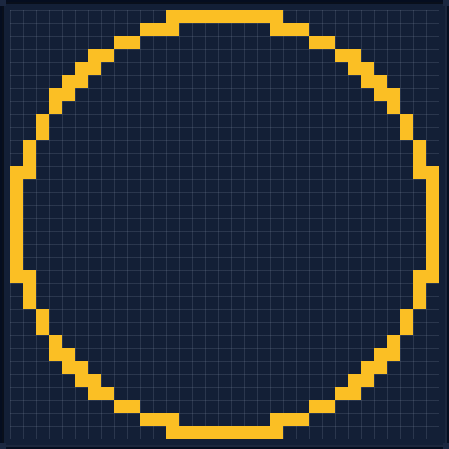
A Minecraft circle generator is a free online tool that turns any diameter into a block-by-block pixel blueprint you can copy directly into the game. Pick a size from 5 to 256 blocks, choose a shape, and the generator draws the exact grid - every row, every block - for circles, ovals, spheres, domes and arcs in both Java and Bedrock editions.
The circle generator uses the same discrete-circle math as the midpoint circle algorithm, which is why odd diameters produce a clean, symmetric ring every time. No downloads, no accounts, and the blueprint is always free.
Sources
The circle generator is based on standard discrete-circle rendering, documented by the following public references:
How CircleGen compares
Specs below come from each tool's own published documentation, checked October 2026. We list where the other tools are stronger too — the comparison is only useful if it is accurate.
| Tool | Shapes | Languages | Per-size pages | Exports | 3D preview | .schem |
|---|---|---|---|---|---|---|
| CircleGenpixelcircle.online | 7 | 11 | 3,179 | 5 | yes | no |
| Donat Studios Pixel Circle Generator | 2 | 1 | 1 | 2 | no | no |
| Godlike.Host Circle Generator | 4 | 1 | 1 | 2 | no | yes |
| Mcgic Circle Generator | 3 | 1 | 1 | 4 | yes | yes |
| Plotz | 6 | 1 | 1 | 0 | yes | no |
| Pixel Circle Generator (pixelcirclegenerator.com) | 4 | 1 | 1 | 3 | no | no |
Where the other tools are stronger
- Godlike.Host and Mcgic reach 512 blocks and export .schem files for WorldEdit. CircleGen caps circles at 256 blocks and does not export .schem.
- Plotz has building presets (wizard tower, lighthouse, snowman) and can print. CircleGen has neither.
- Donat Studios has been online since 2012 and its page carries a decade of user comments. CircleGen launched in August 2026.
A note on similarly named tools
This site is CircleGen at pixelcircle.online. It is not pixelcirclegenerator.com, which is a separate tool with a similar name and a smaller feature set — no 3D preview, no multi-language pages and no per-size blueprint pages. CircleGen has interactive drag-to-rotate 3D preview, 11 interface languages, 3,179 pre-rendered per-size blueprint pages, PNG, SVG, CSV, JSON and /setblock exports.
Full capability matrix
| Tool | Layer slicing | Build animation | World coords | Block count | Presets | |
|---|---|---|---|---|---|---|
| CircleGen | yes | yes | yes | yes | no | no |
| Donat Studios Pixel Circle Generator | no | no | no | yes | no | no |
| Godlike.Host Circle Generator | no | no | no | yes | no | no |
| Mcgic Circle Generator | yes | yes | yes | yes | no | no |
| Plotz | yes | no | no | yes | yes | yes |
| Pixel Circle Generator (pixelcirclegenerator.com) | yes | no | no | no | no | no |
Shape counts are the number of shape families each tool generates (CircleGen covers circle, oval, sphere, dome, arc, torus and ellipsoid). Export counts include image, vector, data and in-game command formats.
Frequently asked questions
How do I build a circle in Minecraft?
Pick a diameter, copy the blueprint from the grid, then place the blocks one by one. Start at the center block and work outward for a perfect result every time.
What circle size should I use?
Small circles (5-15 blocks) suit fountains and windows, 21-49 is right for towers and rooms, and anything above 65 is for huge builds like stadiums and coliseums.
Do the blueprints work for Java and Bedrock?
Yes. The grid shows block positions, so it works identically in Java Edition and Bedrock Edition.
How do I build a sphere or dome?
Switch to the sphere or dome tab, then use the Layer slider to see each slice from bottom to top. Build one layer at a time and the shape assembles itself.
Can I copy /setblock commands?
Yes - hit Copy /setblock to get every block as a /setblock command, with your world coordinates applied. Use Copy All layers for spheres, domes, toruses and ellipsoids.
What is Builder mode?
Builder mode turns the blueprint into a step-by-step guide: click blocks to mark them placed, use Next and Prev to move through the build order, or press Play to auto-advance.
How many blocks for a 21-block circle in Minecraft?
A 21-block diameter circle needs exactly 56 blocks (outline) or 333 blocks (filled). Perfect for small towers, windows, and decorative builds.
How many blocks for a 33-block circle in Minecraft?
A 33-block diameter circle needs 112 blocks (outline) or 833 blocks (filled). Great for medium builds like towers, rooms, and courtyards.
How many blocks for a 101-block circle in Minecraft?
A 101-block diameter circle needs 316 blocks (outline) or 7,957 blocks (filled). Ideal for stadiums, large temples, and coliseums.